MCP · Kaufland
Hosted · no install
Kaufland MCP server for Claude, ChatGPT, and Cursor
Marktspan's Kaufland MCP server lets Claude, ChatGPT, Cursor, or any MCP client query your Kaufland.de and other Kaufland storefronts in plain language: orders, revenue, contribution after fees, and stock. It runs on the same hosted endpoint as Bol.com, so one connector covers every marketplace in your workspace. Connect Kaufland in Marktspan, paste the server URL, and sign in once.
Kaufland MCP server URL
https://marktspan.com/api/mcp
Connect Kaufland to Claude, ChatGPT, or Cursor
Three steps, about five minutes. The same URL works in every MCP client and for every marketplace.
- Create a Marktspan workspace and connect your Kaufland account (one time setup in the app).
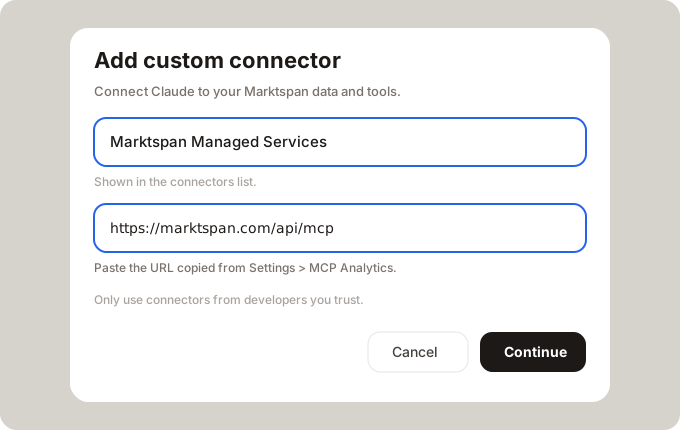
- Claude: Settings → Connectors → Add custom connector → paste https://marktspan.com/api/mcp. ChatGPT: developer mode → Create MCP app → same URL. Cursor: add the URL as a remote MCP server in mcp.json.
- Sign in with Marktspan when prompted, then ask your first question, for example: "How did contribution on Kaufland DE move last month?"
What you can ask about your Kaufland shop
The assistant picks the right tool. Answers use the same numbers as your Marktspan P&L.
- Revenue, orders, and contribution per day, product, or shop, after Kaufland commission and fees.
- Why a product's sales or profit moved, with the likely cause named.
- Single Kaufland orders and order lines, amounts in EUR.
- Stock cover and replenishment suggestions per product.
- Price changes: the assistant prepares Kaufland price updates, shows current and new price side by side, and applies them only after you confirm. Moves over 50% need an extra explicit confirmation.
Kaufland next to Bol.com in one conversation
Because every marketplace sits on one endpoint, you can compare Kaufland with Bol.com or any other connected channel in the same chat. Ask which marketplace earned the most contribution last month and drill straight into the products behind it.
Read only by default
MCP tools analyze your account. Write tools need write access granted at sign in, always show a preview first, and change nothing until you confirm. Changes over 50% need an extra explicit confirmation.
Kaufland MCP tools
A selection of what the server exposes for this marketplace. Your AI chooses the tool; you do not need to remember names.
| Tool | Type | What you get | Try asking… |
|---|---|---|---|
| whoami · list_connections | Read | Your workspace and the Kaufland connections the assistant can query. | Which Kaufland shops can you see? |
| query_metric | Read | Revenue, orders, units, net profit, and margin from your Kaufland P&L, after Kaufland commission and fees. | How did contribution on Kaufland DE move last month? |
| query_metric · sales_pulse_diagnose | Read | Why a product's sales or profit moved: out of stock, price change, delisting, below cost. | Which Kaufland products dropped most this month, and why? |
| query_viz · global_orders | Read | Look up single Kaufland orders and order lines, amounts in EUR. | Show me yesterday's Kaufland orders above €100. |
| query_metric · stock_replenishment | Read | Stock cover and replenishment suggestions per product. | Which Kaufland bestsellers run out of stock in the next two weeks? |
| update_offer_prices | Write | Change Kaufland offer prices. The preview shows current price, new price, and change %; nothing goes live until you confirm. | Lower these five EANs on Kaufland by 3% and show me the preview. |
Example workflows
Monday Kaufland review in one chat
Ask for last week's revenue and contribution on Kaufland, drill into the products that moved, then check whether stock or price explains it.
Compare marketplaces before you shift budget
Ask how Kaufland margin compares with Bol.com for the same products, then decide where to push stock and promotions.
Catch stockouts before they cost sales
Ask which Kaufland bestsellers run low in the next two weeks and how much revenue is at risk.
FAQ
- What is a Kaufland MCP server?
- An MCP (Model Context Protocol) server gives AI assistants such as Claude, ChatGPT, and Cursor tools to read data. A Kaufland MCP server exposes your Kaufland seller data, so you can ask about orders, revenue, and margin in plain language.
- Is there an official Kaufland MCP server?
- No. Kaufland publishes a seller API but does not run an MCP server. Marktspan offers a hosted MCP server on top of your connected workspace.
- Do I need a separate URL for Kaufland?
- No. Every marketplace uses https://marktspan.com/api/mcp. Your workspace connections decide which marketplaces the assistant can see.
- Do I paste Kaufland API keys into my AI app?
- No. You sign in with Marktspan over OAuth. The Kaufland connection lives in your workspace; the assistant never receives marketplace credentials.
- Can the assistant change prices on Kaufland?
- Only with your confirmation, and only if you granted write access at sign in. Every price change is previewed first, and changes of more than 50% versus the current price stay blocked until you explicitly confirm them.
Put your Kaufland shop in the assistant your team already uses
We can walk through connector setup on your workspace.