MCP · Bol.com
Read and write · guardrails built in
Bol.com MCP server for Claude, ChatGPT, and Cursor
Marktspan's Bol.com MCP server lets Claude, ChatGPT, Cursor, or any MCP client read your Bol.com shop in plain language and act on it: check contribution, find wasted ad spend, then change prices, bids, and budgets. Every change starts as a preview and large moves need your explicit confirmation.
Bol.com MCP server URL
https://marktspan.com/api/mcp
Connect Bol.com to Claude, ChatGPT, or Cursor
Three steps, about five minutes. The same URL works in every MCP client.
- Create a Marktspan workspace and connect your Bol.com NL or BE shop (one time setup in the app).
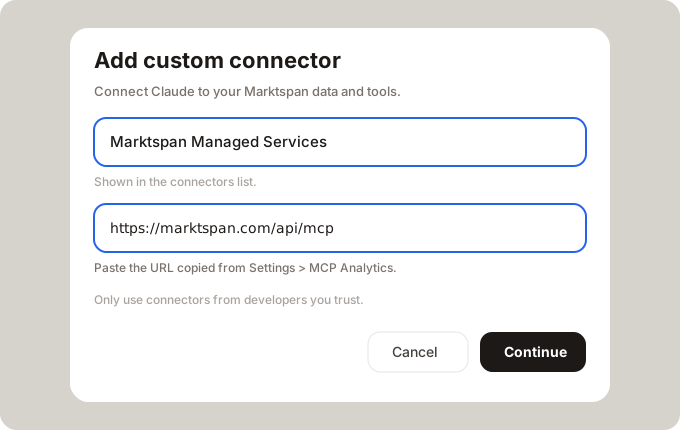
- Claude: Settings → Connectors → Add custom connector → paste https://marktspan.com/api/mcp. ChatGPT: developer mode → Create MCP app → same URL. Cursor: add the URL as a remote MCP server in mcp.json.
- Sign in with Marktspan and choose whether the assistant may only read, or also make changes.
Read: understand your Bol.com shop
The assistant picks the right tool. Answers use the same numbers as your Marktspan P&L and Ad Pilot.
- Revenue, orders, and contribution per day, EAN, or shop, after commission, LVB fees, and ad spend.
- Why a product's sales or profit moved, with the cause named: lost Buy Box, stockout, price, ads, or cost.
- Sponsored Products: spend, ACoS, TACoS, campaigns, and search terms that cost money without orders.
- Keyword demand on Bol.com: search volume, trend, winning bids, and the best leaf categories.
- Finance: Bol invoice lines per order and EAN (commission, pick & pack, shipping, returns).
- Change history: every bid and budget change with old and new value.
Write: act on it from the same chat
When you connect with write access, the assistant can make the change you just discussed.
- Update Bol offer prices for one EAN or a whole list.
- Raise, lower, pause, or enable keyword bids.
- Change campaign budgets, dates, NL and BE targeting, and display channels, or switch campaigns on and off.
- Add new keywords and exclude search terms that waste budget.
- Create a complete new campaign from a plan (created paused, so nothing spends before you check it).
- Update cost prices and product data from a sheet, so contribution stays accurate.
Guardrails on every change
Writing to a live shop needs more than a yes. These checks run on every write, whichever AI client you use.
- Preview first: every write runs as a dry run. Nothing reaches Bol.com until you confirm.
- Current next to new: the preview shows the current price, bid, or budget, the new value, and the change in %.
- 50% rule: any price, bid, or budget that moves more than 50% from its current value is flagged and blocked until you explicitly confirm that change.
- Bid limits: bids above €7.50 need an extra confirmation, bids above €10 or far above the market's winning bid get a warning, and bids outside Bol's €0.20 to €50 range are rejected.
- Scoped access: write access is a separate choice at sign in, only operators can write, and product access groups limit which EANs can change. NL and BE are never mixed.
- Full audit trail: every call is logged, and you can ask the assistant what changed and when.
Bol.com MCP tools
A selection of what the server exposes. Your AI chooses the tool; you do not need to remember names.
| Tool | Type | What you get | Try asking… |
|---|---|---|---|
| query_metric | Read | Revenue, orders, contribution, and stock cover from your Bol P&L, after commission, LVB fees, and ad spend. | Did contribution on Bol NL drop last week? |
| query_metric · sales_pulse_diagnose | Read | Why a product's sales or profit moved: lost Buy Box, out of stock, price change, ads cut, below cost. | Which EANs lost the most revenue this month, and why? |
| get_ad_decision_pack | Read | TACoS, contribution, floor price, unit cost, and stock per product before you touch a bid. | Can I afford to bid more on my top 10 products? |
| get_search_terms | Read | Search terms with clicks, cost, conversions, and ACoS. | Which search terms cost money this month with no orders? |
| search_keyword_demand | Read | Bol.com search volume, trend, and average winning bid. Works without a connected shop. | What do Dutch shoppers search for around 'airfryer'? |
| query_viz · bol_finance_report_lines | Read | Bol invoice lines per order and EAN: commission, pick & pack, shipping, returns, corrections. | What did Bol charge in commission on this EAN in September? |
| get_ad_activity | Read | Every bid and budget change with old value, new value, time, and source. | What changed in my campaigns this week? |
| update_offer_prices | Write | Change Bol offer prices. The preview shows current price, new price, and change %. | Raise these five EANs by 5% and show me the preview. |
| update_keyword_bids | Write | Set keyword bids, or pause and enable keywords, with current bid next to the new one. | Lower bids on keywords with ACoS above 40%. |
| update_campaign | Write | Daily or total budget, on or off, start and end date, NL and BE targeting, display channels. | Raise the budget on my best campaign to €40 a day. |
| create_keywords · create_negative_keywords | Write | Add exact or phrase keywords to an ad group, or exclude search terms that waste budget. | Exclude the search terms that spent money without orders. |
| create_campaign | Write | Build a full Sponsored Products campaign from a plan. Created paused unless you ask otherwise. | Create a campaign for my new airfryer EANs with €20 a day. |
| import_product_sheet | Write | Update COGS, lifecycle, category, package dimensions, and segments from a sheet, so P&L stays right. | Here is my new cost price sheet, update COGS. |
Example workflows
From Monday review to fix in one chat
Ask how contribution on Bol NL moved last week, drill into the EANs behind it, and lower the bids that no longer pay back. The preview shows each bid before and after.
Cut wasted ad spend
Ask which search terms spent budget without orders, exclude them, and pause the keywords that keep losing money.
Reprice safely
Ask for EANs priced below their floor, prepare new prices, and review the preview. A typo that would halve a price is caught by the 50% rule before it goes live.
FAQ
- What is a Bol.com MCP server?
- An MCP (Model Context Protocol) server gives AI assistants such as Claude, ChatGPT, and Cursor tools to read and change data. A Bol.com MCP server connects them to your Bol seller account: orders, revenue, ads, keywords, and prices.
- How do I connect Bol.com to Claude?
- Connect your Bol shop in Marktspan, then in Claude open Settings → Connectors → Add custom connector, paste https://marktspan.com/api/mcp, and sign in with Marktspan.
- Does it work with ChatGPT and Cursor?
- Yes. Any client that supports remote MCP servers works with the same URL: ChatGPT (developer mode MCP app), Cursor, Claude Code, VS Code, and others.
- Can the assistant change prices, bids, and budgets on Bol?
- Yes, if you grant write access when you sign in. Every change starts as a preview showing current and new values, and it only goes live after you confirm.
- What stops a wrong change from going live?
- Each write is a dry run first. Changes of more than 50% versus the current price, bid, or budget are blocked until you explicitly confirm them, high bids need extra confirmation, and every call is logged.
- Do I paste Bol API keys into my AI app?
- No. You sign in with Marktspan over OAuth. The Bol connection lives in your workspace; the assistant never receives Retailer API credentials.
Run your Bol.com shop from the assistant your team already uses
We can walk through connector setup on your workspace.